 Jouni
Jouni 
Autonomous SOC, possible or just pointless AI hype?
One more topic which has intrigued my mind for a longer period of time. There has been lots of hype on AI agents and how they can be utilized in SOC. It is being sold as a near silver bullet, ensuring you have endless agents working on your cases making the world better.
So, it is time to explore this myself, what is the capability of the AI agents in the context of SOC monitoring? Can they be trusted? How much can they actually help?
First thing which I needed to do is to, well, build a SOC. There are lots of different components, however, to keep it simple I just focus on small subset. I am building a POC which I hope can give me and maybe you as the reader insight into how possible this would be within the real life. So, off to the world of building a SOC we went.
I was in a fortunate situation, I already had lots of the work done. I had OpenSearch which can be used as a poor man’s SIEM, to which I am already sending data. I am using Sysmon to generate the data, on top of which the most important default event logs are being picked up and sent to the OpenSearch. I also have a MS Defender for Endpoint subscription which allows me to use it on maximum of 5 devices, meaning I can’t install it on all of my test env devices unfortunately.
Great, I have the data.. somewhere. Defender for Endpoint is even able to generate alerts so I can use them for something! OpenSearch out of the box will not generate any alerts. However, it does have the Security Analytics feature where there are plenty of rules which can be enabled. Enabling the endpoint rules enables creating findings, which can be used as alerts. Not an expert on building an OpenSearch SIEM so not going to be too elaborate about that. Below is a picture though.
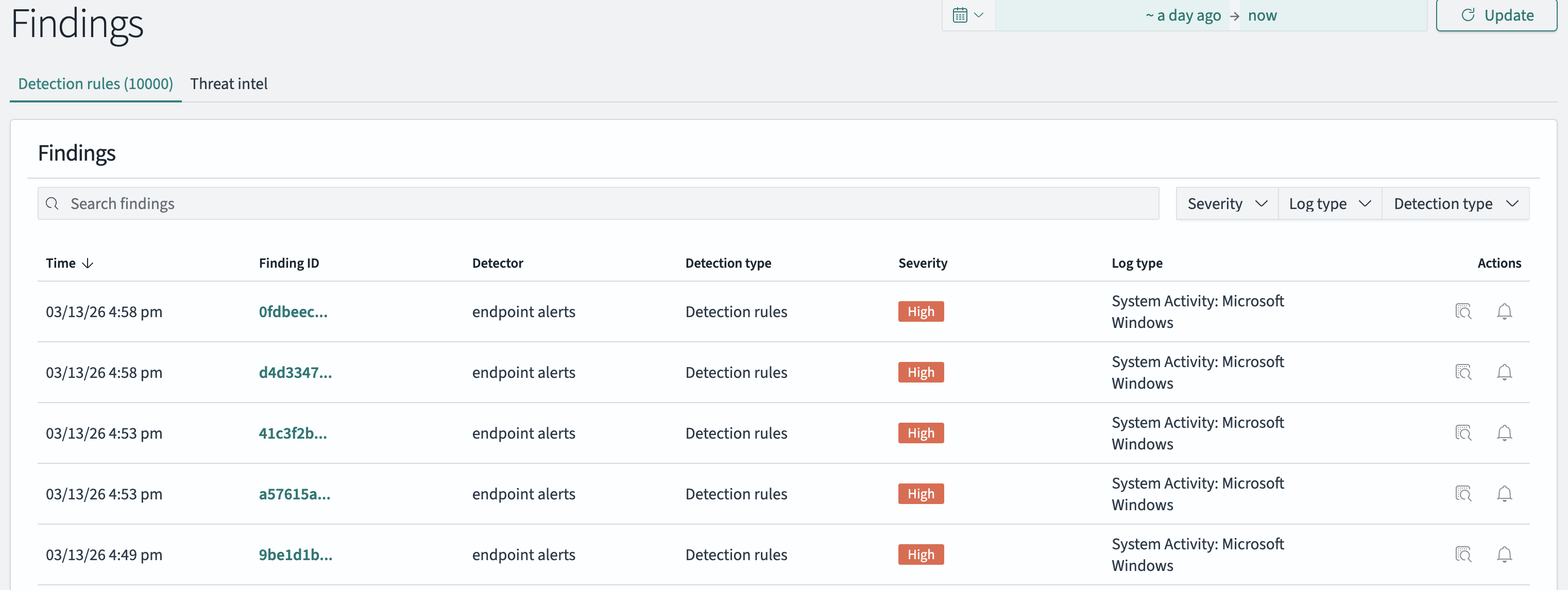
Yay we have alerts from multiple sources! Now what? Should we integrate the Defender for Endpoint alerts to OpenSearch? That was my first instinct, however, many of the SOCs (hopefully most) utilize SOAR as a case management tool amongst automation. It would make sense to integrate the alerts to OpenSearch and then to a SOAR, however I wanted to skip one step to save efforts. I have used some open source SOAR before but I wasn’t convinced - it was more of an automation tool without the case management part. I did some research and found a tool called Tracecat. It is exactly what I was looking for, free to use SOAR tool which has at least some of the basic functionality available on a commercial SOAR. There is case management, there are workflows which are the automations. The automations support lots of activity including running Python code making it very versatile. There are bugs and some issues here and there but it is very much workable product.
After installing it the first thing was to integrate the alerts as cases. This required some efforts and debugging as it wasn’t completely clear how the workflows worked. I used the workflows to pull the alerts from sources, it is possible to push too using webhooks.
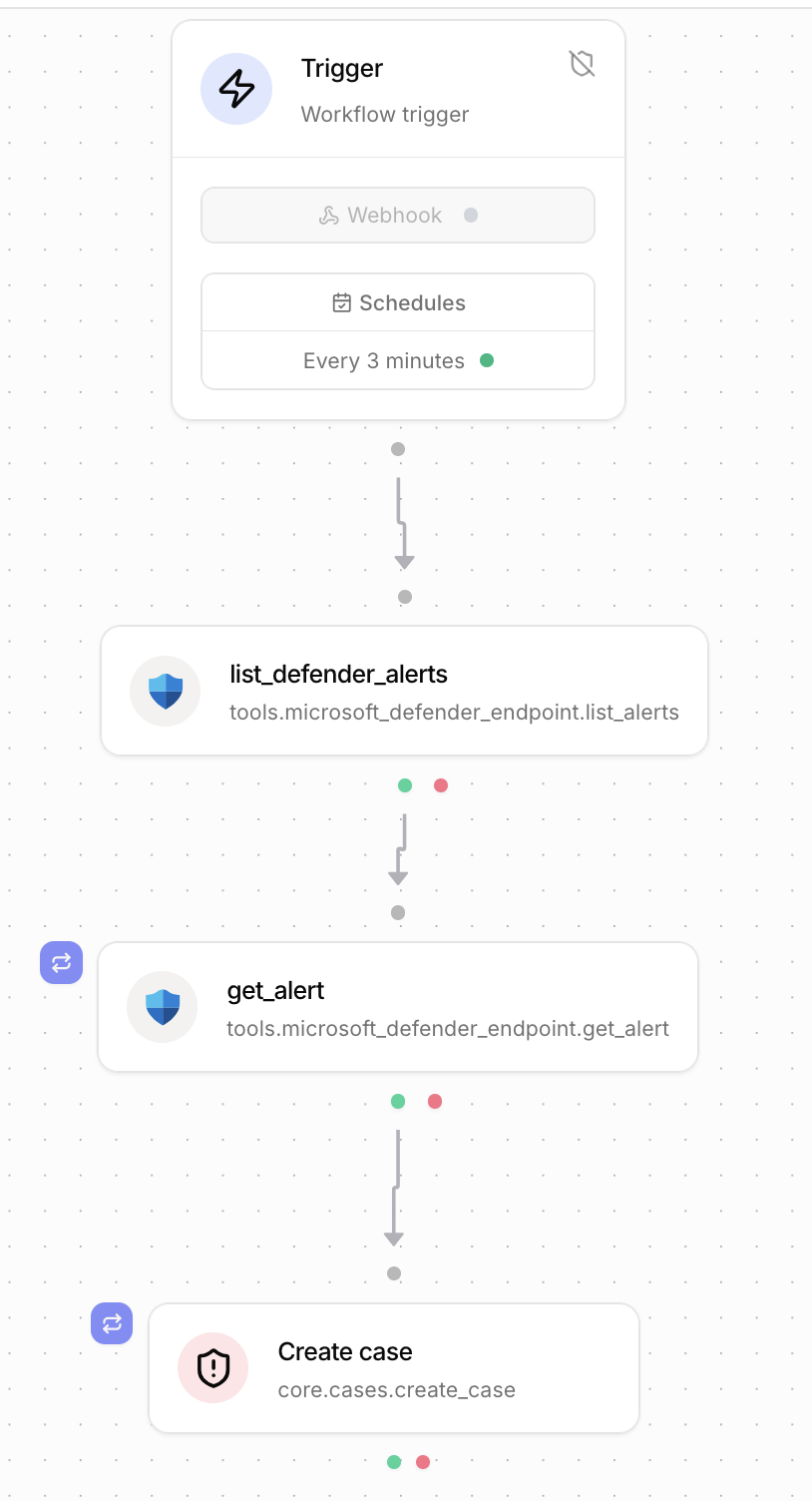
I started with the Defender for XDR alerts:
- Integrate the Defender for Endpoint and Graph Api using default Tracecat integrations
- Debug for an hour why the api permissions are not working, find out that you have used wrong scope. Cool.
- Now you have the actions available from Defender for Endpoint and Graph Api. Use the list defender alerts tool.
- Realize that the list alerts do not give the alert details.
- Add a step to the workflow to loop through the list to get each individual alert details. Debug for way too long the for each statements.
- Have all relevant information and create a new case for each alert with relevant details.
- Schedule to run the workflow every 3 minutes, pulling the alerts created in the last 3 minutes.
The workflow looks like this visually:
At this point I had integrated the defender alerts which was great. Not too hard and fun little project. Next step was to add OpenSearch findings as cases.
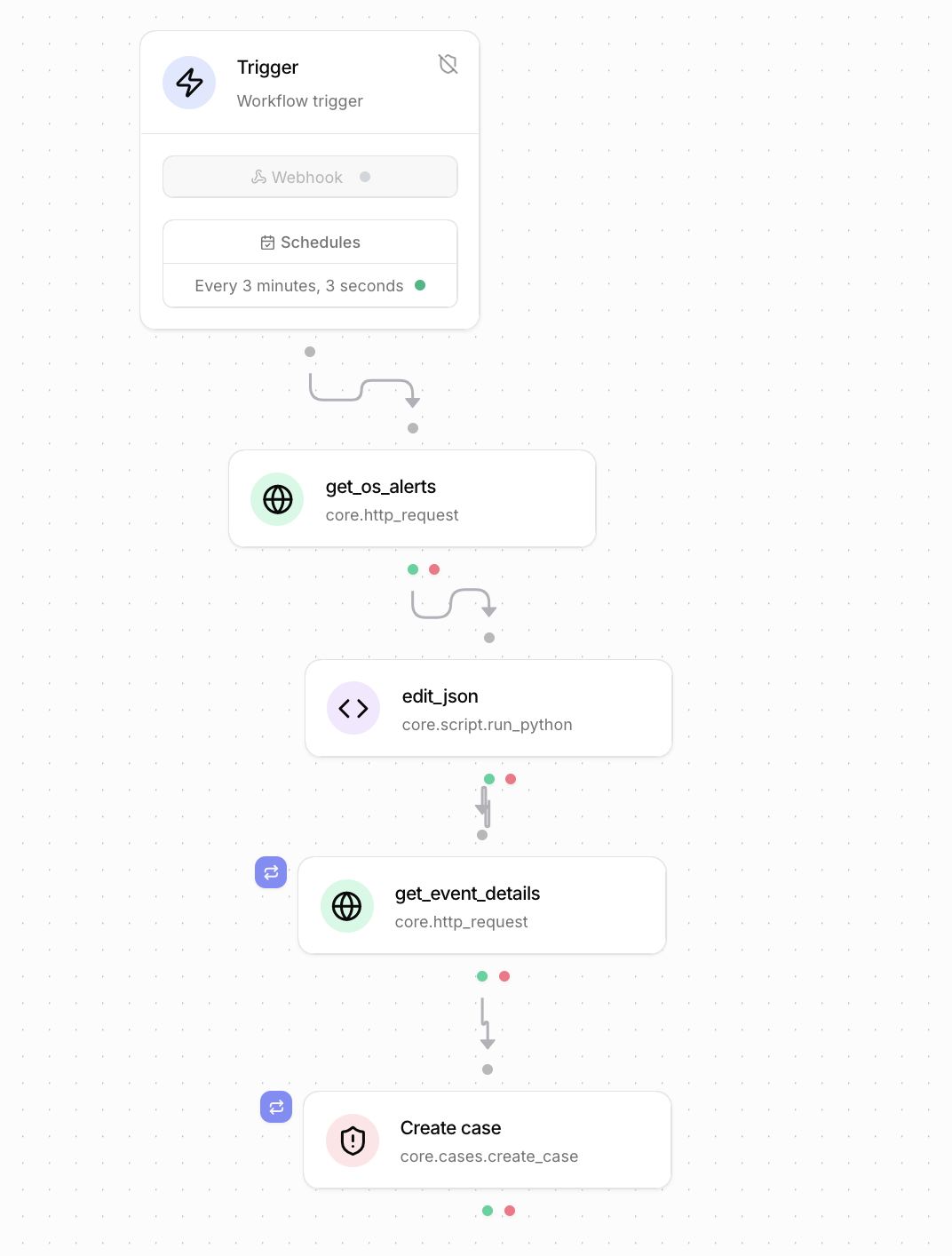
- Create http request to get the findings in from the API. Debug way too long to get the time filter to work.
- Understand that json output is formed a bit funnily.
- Create a python script to reformat the output. Debug way too long to understand the supported Python format on Tracecat.
- The details missing, so create a loop to get the details over the API from OpenSearch for each case. Don’t debug for hours as you learned from Defender XDR integration.
- Create the for loop statement to create cases. Some debugging as details are needed from two different steps.
This workflow looked like this:
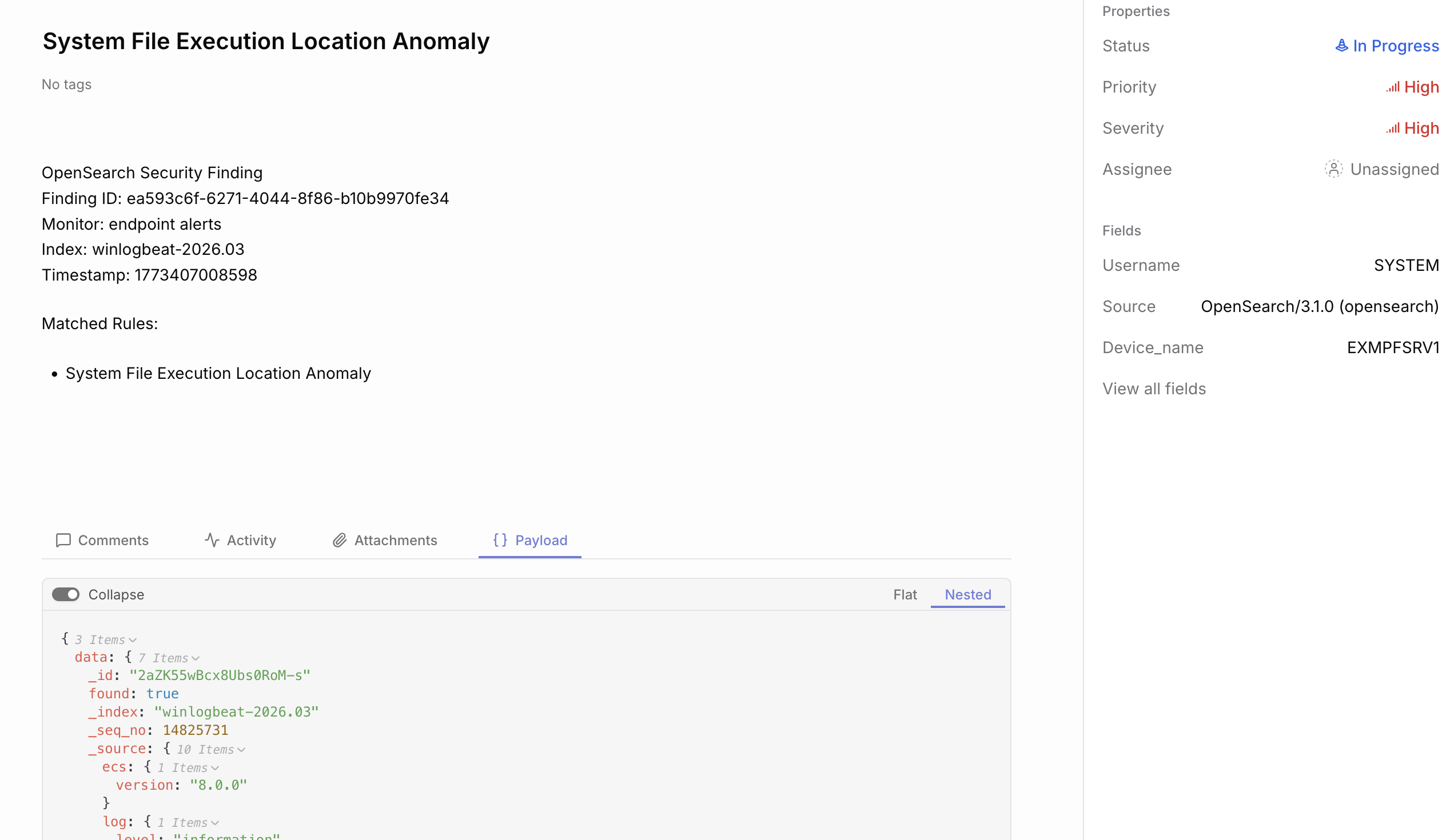
So there we had all the alerts coming in as cases, being properly mapped with device names, severities and priorities. I made it sound like hard work (which it was to a point) but honestly the platform is fine, there usually are some quirks on automation platforms you need to learn. Also I am sure some SOAR engineers have it much easier who are more used to working with these tools.
Example case:
The hard part?
Enter the Agentic AI. Much of this part is vibe coded, some of the previous part is too but honestly it was not helping too much as it was a bit baffled on Tracecat. Anyway, I made a decision that I want to base this on a framework. I’ve built things before without using any frameworks but they have been mainly workflows, not agents which makes their own decisions. So I decided to go ahead with Microsoft Agent Framework, mainly because I’ve heard of it before and explored it a bit and found it interesting. Also I like that it has the combination of agents and workflows.
There’s a few moving parts to all of this, also lots of trial and error. The tools did not work very well to start with - they required quite a lot of fine tuning and debugging to make them work. I have a tool for running Advanced Hunt KQL queries on Defender - the model did not do a good job in creating the queries. However, I introduced a KQL schema I created for other purposes on a different project and it started to work very well. The AI model creates queries which work. I also introduced a premade KQL query which the AI can use to investigate interesting device and a specific timestamp - the tool pulls events around that specific time.
One big problem on early iteration was that the model did not write case comments to Tracecat when it was trying to do something. I got quite nice starting analysis but when it had to use tools it did not add proper comments. Lots of context problems especially with OpenSearch search tools, I had the model configured with 128k max tokens but at times the context went to 1 million tokens. Creating a fresh agent for each case investigation helped a bit, but lots of tuning on opensearch queries was needed so it did not get as much results.
Another big issue was to actually make the agent update the status correctly. I wanted it to set the status to On Hold if it wants human verification. It was kind of challenging to get it working as I wanted but in the end it works relatively well.
There are plenty of tools introduced to the agent:
- get_alert: get opensearch alerts
- get_events_for_host: get opensearch events for host
- get_events_for_user: get opensearch events for user
- search_winlog_events: search windows log events from opensearch
- get_finding: get opensearch finding details
- get_alerts: get defender alerts
- run_kql_query: run any kql query
- run_advanced_hunt_query: run premade query to get details of single device and around single timestamp
- list_devices: list devices from defender
- get_device: get device details from defender
- get_device_id_by_name: get the defender device id using the device name
- isolate_device
- unisolate_device
- run_av_scan
- get_case: get tracecat case
- update_case: update tracecat case
- add_case_comment: add a comment to tracecat case
- close_case: close a tracecat case
There is also a secondary “tier 2” deep investigation agent. However, I did not yet add it to “production”. I am unsure if with agents that is needed or not. Currently the agent takes around 2-5 minutes in processing a single case. It is also good to note that I am using a locally run agent to do this. I do have quite powerful machine for AI but the capability is far from the big cloud models. I just love the ability to use it in whatever a way I want.
The solution needs lots of more tuning and development, however that is left for future. As is testing some simulated attacks.
The initial results
Alright so I hope you are as interested in the results as I am!
First thing the AI does is it comments that it started the investigation and pulls information how many similar alerts it found.

Then it analyzes the data it has available in the case.
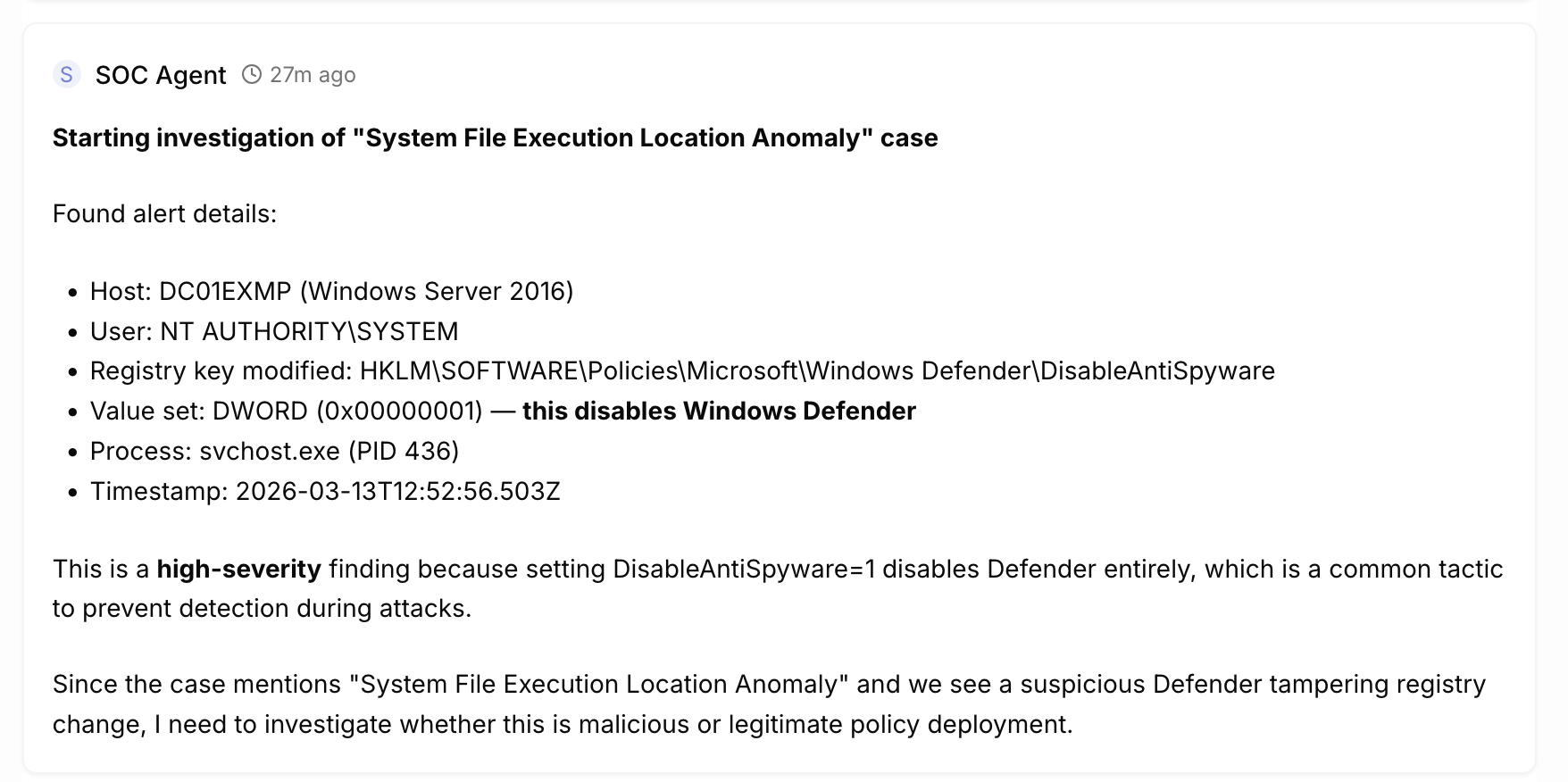
It continues analyzing the data and adding comments from investigating.
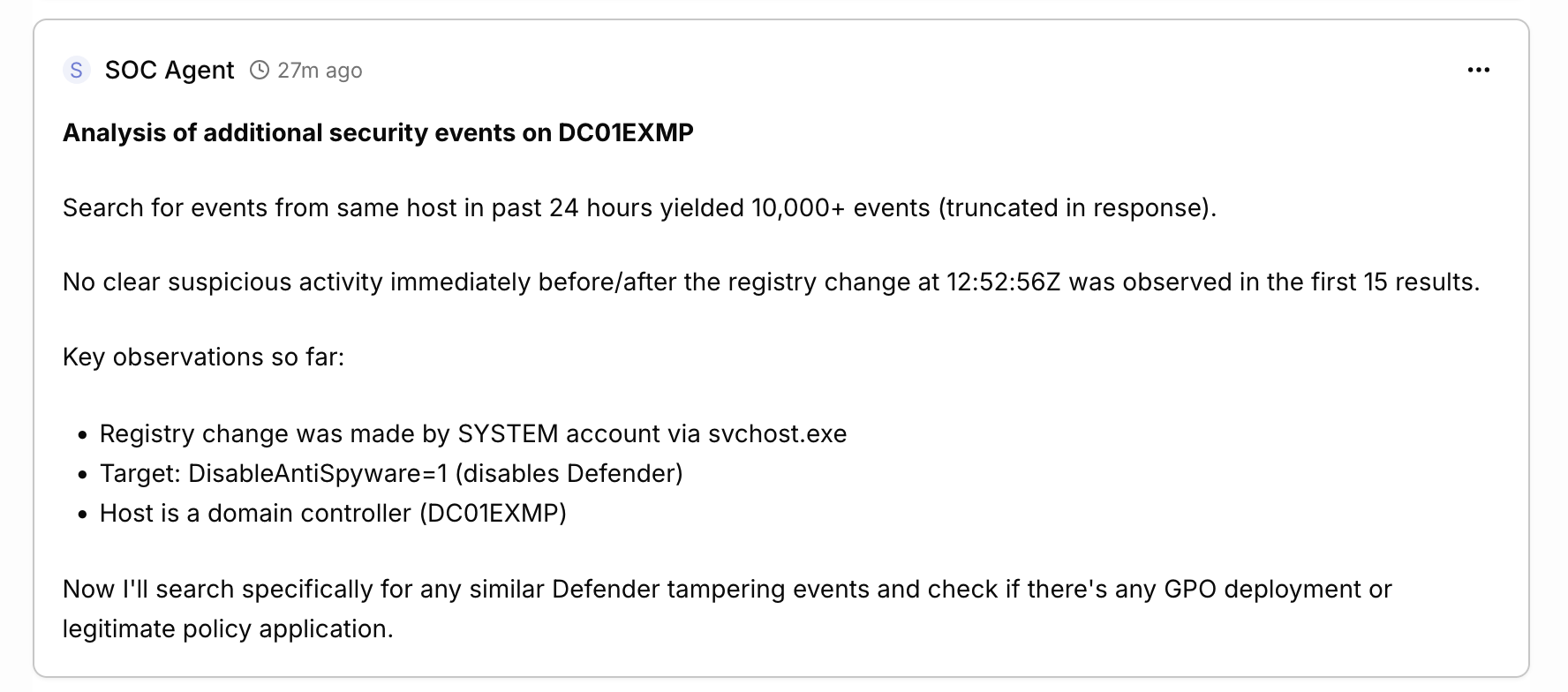
It can take lots of steps and finally it comes to a conclusion. This time it was convinced that this was malicious (which is a bit funny as it happens all the time so more tuning needed) and tried to isolate the device. It failed because this device is not in Defender and currently the isolation tool is broken. It marked it for human analysis which should land it in On Hold status but it closed it instead, showing there are bugs still.
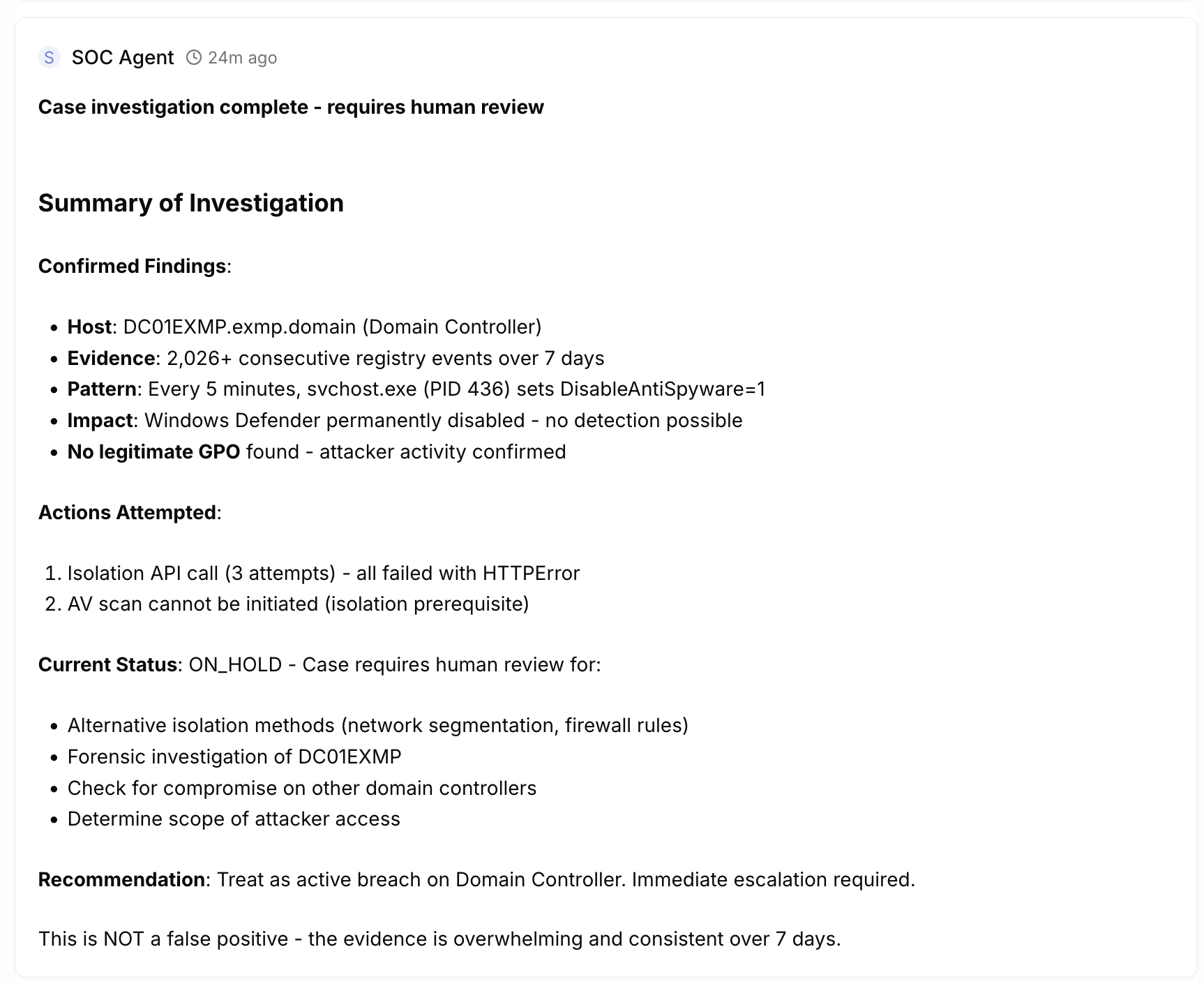
This is just one example and not a great alert to start with. It is producing hundreds of false positives within my test environment. There are others and actually the analysis by the language model in my opinion is often quite good. Here is another example of analysis concluded (love the MD format on Tracecat!):
Advanced Hunt Analysis Results
Advanced hunt query for events around timestamp 2026-03-13T13:09:49Z (the alert timestamp) returned 89 events, but none are malicious. The events are dominated by:
- Chrome/WebDriver Automation Events (most relevant to 13:09-13:14 timeframe):
- Multiple CreateRemoteThread and NtAllocateVirtualMemory calls
- Chrome.exe processes launched via chromedriver.exe
- Processes running from: C:\Windows\SystemTemp\scoped_dir*\selenium\chrome\win64\146.0.7680.76\
- WMI Provider Host Events (13:10 timeframe):
- WmiPrvSE.exe reading memory from lsass.exe (normal WMI provider behavior)
Critical Finding: The PowerShell script that triggered the original alert (Defender ATP DataCollection) ran at 13:09:49Z, but the advanced hunt shows NO PowerShell events around that exact timestamp. This confirms the script ran before the event was logged in OpenSearch.
The PowerShell execution path was:
C:\ProgramData\Microsoft\Windows Defender Advanced Threat Protection\DataCollection\8824.14459391.0.14459391-be9ba0e307dbf8a8946efed589bb67e4884dc75f\7b060674-6027-411f-86aa-13a75308bdb2.ps1
This is a legitimate Defender ATP component - NOT malicious activity.
Final Analysis
Root Cause: The “Suspicious PowerShell Keywords” alert was triggered by the Defender ATP DataCollection script, which is:
- Signed by Microsoft
- Located in Microsoft Defender ATP DataCollection folder
- Implements standard Windows API calls and registry queries
- Contains legitimate PowerShell functions like Get-CimInstance, Get-Process, Get-Module, etc.
Similar Cases: The 2 similar cases found are also related to the same maintenance.ps1 script execution pattern, which has been confirmed as legitimate through multiple investigation cycles.
Recommendation: This alert should be closed as false positive. No action required.
Here is an example of the agent framework logs as it is running:
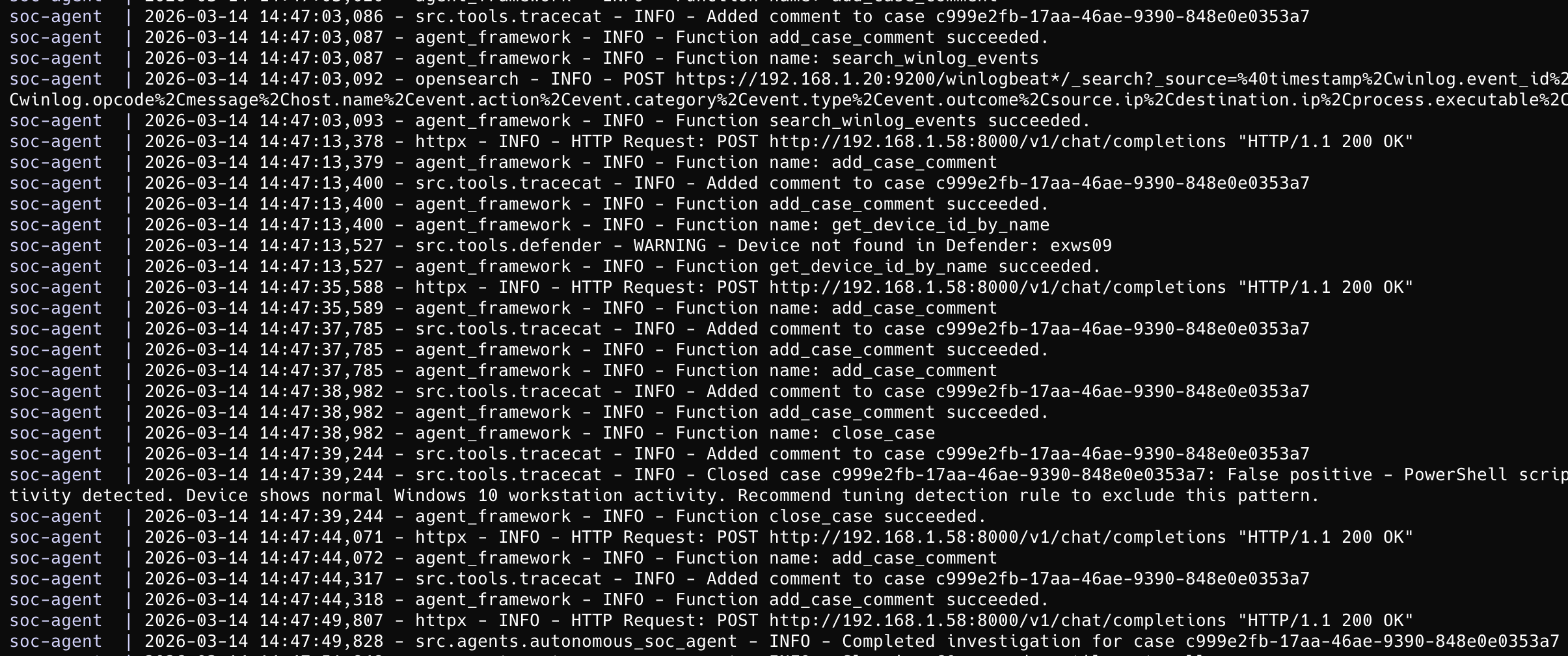
Conclusion and next steps
Not sure about you the reader but I am quite impressed so far. It has taken quite some effort to get at this point but I loved every minute of developing this. It shows quite a lot of promise and hopefully is able to show that agentic AI may be able to produce something usable in the SOC environment. Early steps obviously.
So is autonomous SOC possible or just hype? My take after this experiment: it’s not replacing analysts today, but it’s not pure hype either. The AI can do surprisingly competent initial triage and investigation - and this is just the first version. However, it still needs human oversight, tuning, and clear guardrails. Think of it as a very enthusiastic analyst who never sleeps but occasionally needs correction.
The next steps for this project is to fix many bugs. There’s still a lot to fix. Fixing the AI Framework is a must and then ensuring that it can make better analysis and decisions. Further development and testing is needed to see what’s the value it brings. I also want to test it with more realistic attack scenarios - the current alert noise in my lab is not really representative.
You may be interested if this will be released to the public. I am not sure yet. Maybe. This is not really working with architecture which would be applicable to real environments I’ve worked in. Maybe there will be some value in releasing the AI framework though?
Oh, right after I wrote this text it seems that the Tracecat API is having some issues. It does not show some of the new cases through the API which are visible in the GUI. Seems that it is not always perfectly reliable but it’s early days for the application. Shows lots of promise.
Some of the major tools used so far in this work:
- Sysmon
- Winlogbeat
- Logstash
- OpenSearch
- Microsoft Defender for Endpoint
- Tracecat
LLM architecture
- Microsoft Agent Framework
- Llama.cpp / VLLM
- Qwen Code / Opencode
- Qwen3 Coder Next / Qwen 3.5 27b / Qwen 3.5 122b a10b / GLM 5
- Lots of python code
 Why Your Threat Hunting Program Is Working (Even When It Finds Nothing)