 Jouni
Jouni 
TI Dashboar: AI generated Cyber Threat Intelligence dashboard
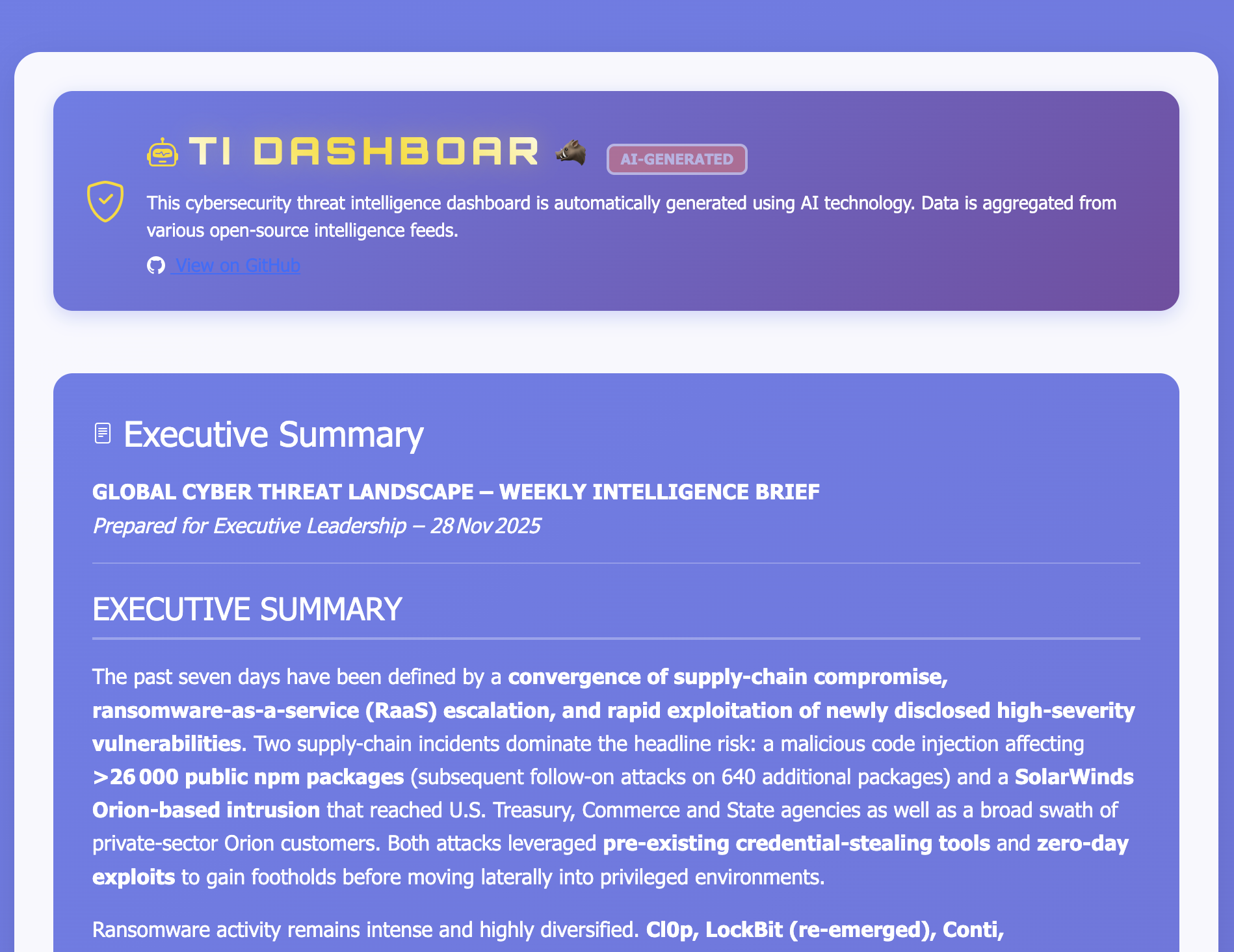
I’ve been developing a cybersecurity intelligence dashboard which led me to write about this topic. I’ve built a tool that automatically monitors cybersecurity news sources, enriches the data with AI-powered analysis, and delivers intelligence through a website. The system has evolved from a simple RSS reader into a multi-service architecture that analyzes the data and provides a summary to the viewer. The name as you may have guessed, started from a typo.
This project was created for my personal use as I’ve been struggling with keeping up on all the news sources through traditional RSS reader. I just don’t have the time to dig through of them and wanted to build something where I can get an understanding of the current threats but also find more details about some areas which could interest me more. The TI Dashboar tries to address this challenge through a fully automated pipeline that transforms raw cybersecurity news into structured intelligence. This was never inteded to be released to the public; however, as some of the lovely friends and colleagues liked the tool I made the decision to release the dashboard part. The underlying code has not been released mainly because it would need to be rewritten heavily and also there are dependencies outside of this project like opensearch and the LLM components.
System Architecture
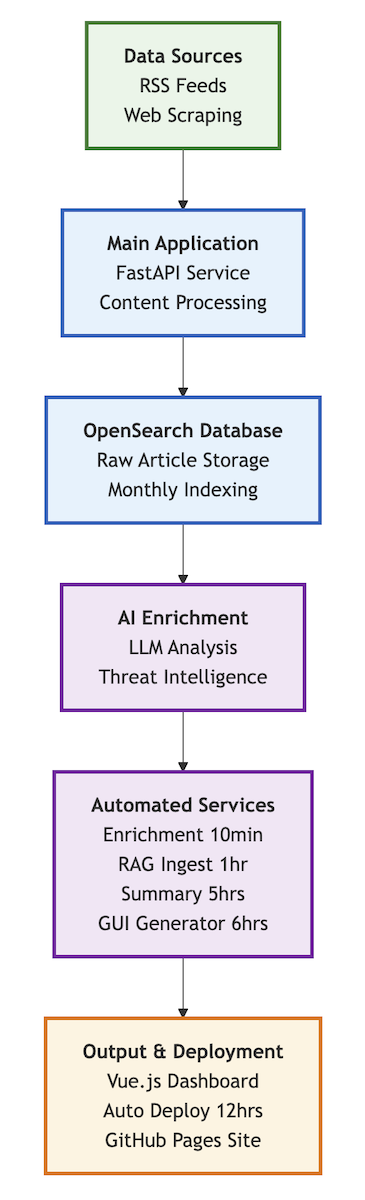
The entire system is built as a containerized microservices architecture using Docker Compose. This does NOT include the local LLM or the OpenSearch database, which I have deployed as a separate solutions. Here’s how all the components work together:
Continuous Processing Pipeline
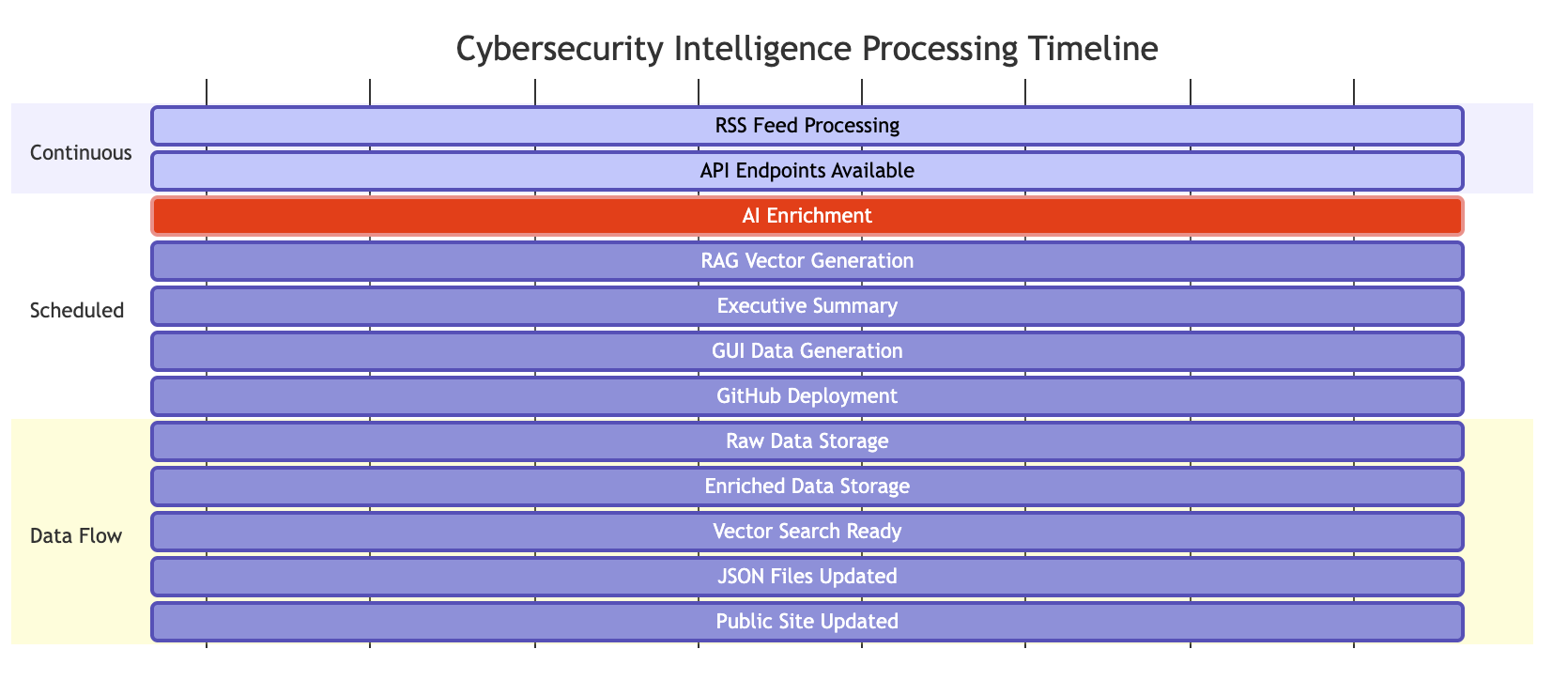
The system operates on a sophisticated timeline that ensures continuous processing and updates:
Core Services Deep Dive
Main Application Service
The cybersecurity-news-monitor container is the heart of the system. It handles RSS feed processing with deduplication algorithms to prevent processing the same articles multiple times across different sources. Sometimes it works, some times it does not. The web scraper component includes intelligent rate limiting, caching, and robots.txt compliance to be a good internet citizen while extracting content from sites. This was created to be part of the pipeline so if the GenAI decides it has not enough details it could scrape the page.
What makes this service particularly interesting is the content assessment module that automatically evaluates article quality and determines enrichment needs. This ensures that only high-quality, relevant content gets processed by the AI enrichment pipeline, optimizing performance.
AI-Powered Enrichment Pipeline
The enrichment process is triggered every 10 minutes by the enrichment-scheduler container. This lightweight service uses a simple curl loop to call the main API’s enrichment endpoint, ensuring that new articles are processed promptly without overwhelming the system. It also marks the article as enriched so it does not process the same article multiple times. Technically, it uses two different indexes in OpenSearch, one for the ingested RSS news and one for enriched articles.
The AI enrichment itself is quite sophisticated. I’ve implemented specialized prompt templates designed specifically for cybersecurity analysis:
- Threat Intelligence Extraction: Identifies specific threat groups like Scattered Spider, APT28, or LockBit, even when articles use different terminology or aliases
- Vulnerability Analysis: Parses CVE numbers, CVSS scores, and identifies affected systems
- Risk Assessment: Analyzes potential business impact and provides prioritized recommendations
- Entity Recognition: Extracts and categorizes security entities like malware families, attack techniques, and affected industries
- Incident Response Profile: Provides information related to the data breach if the article was classified as one
The system uses local LLMs to maintain data privacy while still providing analysis capabilities. However, a cloud service could also be implemented with relative ease as long as compatible with OpenAI API. This is still a GenAI so the outcome, and quality may vary. This is important to understand; the output can never be fully trusted but it still can provide value.
Semantic Search with RAG
The rag-ingest service runs every hour, pulling enriched documents from OpenSearch and generating vector embeddings for semantic search. This allows to query the entire threat intelligence database using natural language - they can ask questions like “show me all ransomware attacks targeting healthcare in the last month” and get relevant results instantly. Mainly created for my personal use and not exposed currently. Very limited use but cool addition, maybe something which could be used for other purposes in the future (thinking of some sort of Threat hunting agent).
The system uses the OpenSearch scroll API to handle unlimited data volumes, ensuring that even with millions of documents, the vector generation process remains efficient and doesn’t hit memory limits.
GUI Data Generation and Deployment
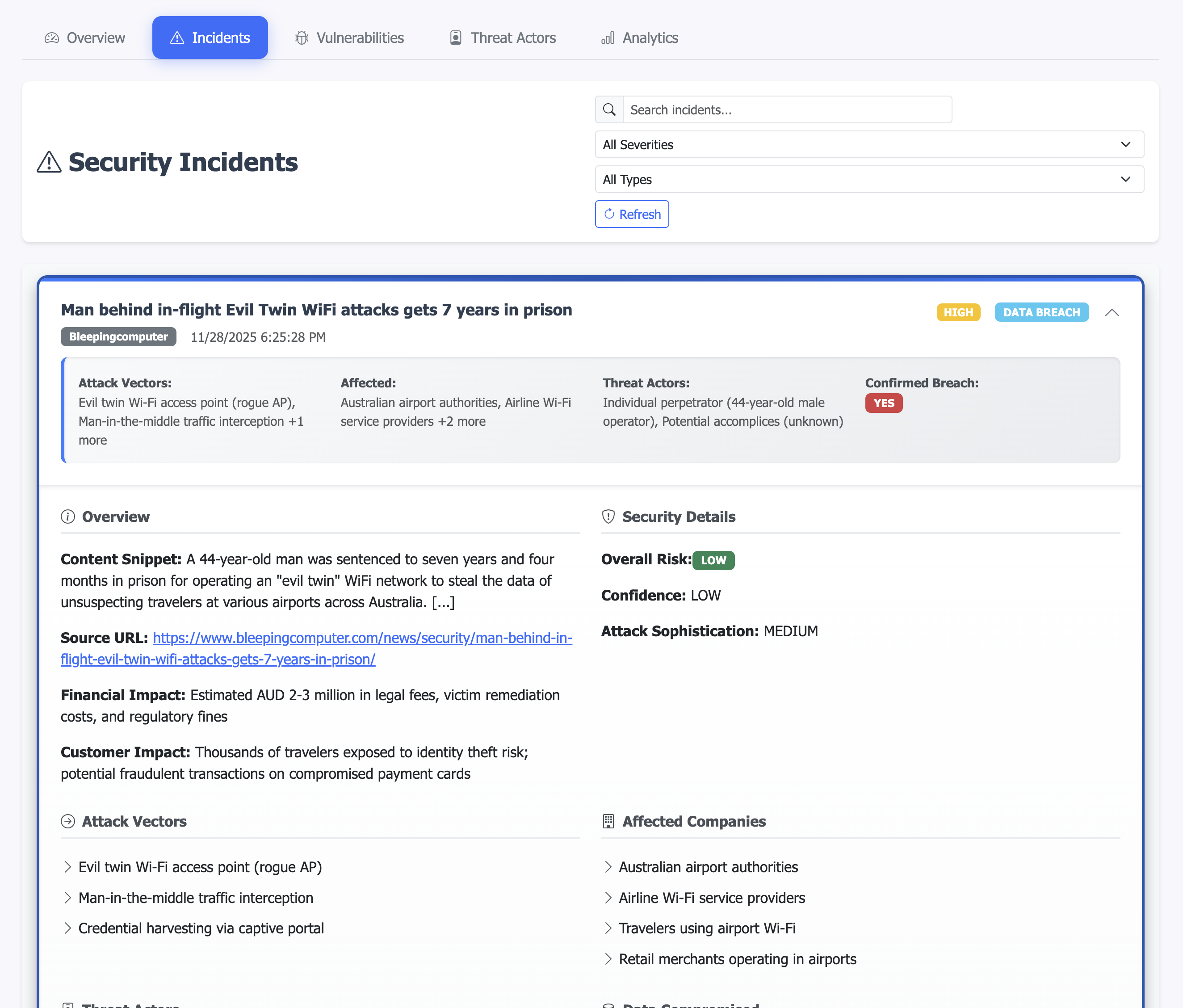
The gui-data-generator service runs every 2 hours and performs a complete extraction of all enriched data from OpenSearch, transforming it into structured JSON files optimized for the frontend dashboard. This is the tool which created the JSON files for incidents, vulnerabilities and similar. JSON as I wanted it to be easily deployable as a static webpage.
The following picture shows a snapshot of one of the incidents which is created in to the json file and rendered to a nice web page.
Executive Intelligence Generation
Every 5 hours, the summary-scheduler generates executive summaries. This isn’t just a simple aggregation - the system uses AI to identify trends, highlight critical threats, and provide actionable insights for executives. The summaries include statistical analysis, threat actor attribution, vulnerability assessments, and even predictive insights based on historical patterns. This is the main component exposed to the public website.
This could use further development and one feedback I received was to make it industry focused. I may do that in the future but so far I wanted it to be generic. Having it creating an industry specific reports would be great though so I really apperciate the feedback and understand the value!
The GitHub Pages
The automated deployment to GitHub Pages is particularly significant because it provides automated updates without me actually doing anything. Everything has been automated so as long as the containers are running the web page is updated every 12 hours. This will cause issues though, sometimes there will be bugs or something crashing and the web page may not work as intended until I get to fix it. This is fine for this kind of project.
There’s many benefits to this approach:
- Global Accessibility: Anyone with an internet connection can access the latest cybersecurity intelligence
- Zero Maintenance: The site updates automatically without any manual intervention
- Mobile-Friendly: The responsive design works on all devices
- Fast Performance: GitHub Pages provides CDN-level performance globally
Gui deploy service
Every 12 hours, gui-deploy container automatically deploys the generated intelligence data to a GitHub Pages site, making the threat intelligence publicly accessible. The deployment process includes:
- Copying all JSON files from the data generator
- Committing them to the GitHub repository with timestamped messages
- Pushing to GitHub Pages
- Automatically updating the public website
This creates a continuous deployment pipeline for threat intelligence, ensuring that the public dashboard at tidashboar.threathunt.blog is up-to-date.
Technology Stack
Backend Services
- FastAPI: Python web framework for the REST API
- OpenSearch: Distributed search and analytics engine for data storage
- Docker: Containerization for consistent deployment and scaling
AI/ML Components
- Local LLMs: Privacy-focused AI processing
- Embedding Models: Vector generation for semantic search
- RAG (Retrieval-Augmented Generation): Advanced search capabilities
- Specialized Prompts: Domain-specific cybersecurity analysis templates
Frontend & Deployment
- Vue.js 3: JavaScript framework for the dashboard
- Chart.js: Interactive data visualization
- GitHub Pages: Static site hosting for public intelligence
- Bootstrap 5: Responsive UI framework
Conclusion
The TI Dashboad tool represents in my opinion a cool use case for utilizing LLMs for automated threat intelligence. By combining automated collection with AI-powered analysis and continuous deployment, it makes it much easier for me to personally consume RSS feeds. As the tool is now also available for the public in form of the web page I hope that it may give insights to others as well.
What started as a simple RSS feed reader has evolved into a tool that demonstrates how modern technologies can be applied to solve Security Operations challenges. This tool does not come without it’s problems - there’s things like hallucinations which we need to understand. However, I think it has been interesting to develop something which is close to my heart - enhancing security operations with modern GenAI tools. This project is a combination of GenAI and automation and shows some of the capabilities which can be delivered with the modern approach.
I am more and more interested in implementing Artifical Intelligence within security operations. Not only limiting to GenAI but I think that when the current SOCs are utilizing more and more data lake approaches it allows for more machine based threat detection capablities. Machine learning and Deep Learning offers amazing use cases for picking up anomalies where the traditional use cases may struggle. It is not going to replace the use cases though but something which can be especially useful for threat hunting purposes.
The further development for this particular tool will be sporadic. I have some ideas how to enhance it but currently I have quite limited to work on this. That said, I still intent to update it further.
The public dashboard is available at https://tidashboar.threathunt.blog/ and the GitHub repo hosting the data at https://github.com/JouniMi/tidashboar.github.io.
 Scattered Spider: When Social Engineering Meets Supply Chain Risk