 Jouni
Jouni 
Fine tune a small model for profit(?)
One of my older ideas has been to play with fine tuning the small language model(s). I have thought about testing how much of an affect it may have in different things, in this instant in detecting anomalies from masses of data. For testing I decided to drop the model size from my default 27B to 12B and I chose to fine tune the Gemma 4 model. The tested approach is to enhance the model with new information of what normal looks like in my lab environment. And funnily enough, I have data saved from my lab to a local Clickhouse instance which makes reading the data a breeze.
Disclosure: most of the code done within this experiment is AI-generated, I had to learn lots of the concepts used while experimenting. The text on this blog isn’t but I did use AI to proofread it. There could be mistakes as this is a new area to me.
Getting the data
As mentioned, the data is already collected to my Clickhouse instance. We have on average 154k events per day as the lab is not massive. It mostly contains default windows logs but it is enriched with sysmon data. What was important in this experiment was that I only pull “clean” data. I have conducted many experiments in the lab and some of them have utilized attack tests against the lab. I did not want them to taint my lovely clean data.
The preprocessing of the said data was done first with a simple Python script which first normalizes the data and then saves it into a jsonl file. It needs to have a valid structure so it can be used in fine tuning and the contents of the jsonl file looks something like this:

Fine-tune a model you say?
Yes! Though it’s nothing magical; you just further train an existing model on a specific dataset. The goal is to improve the performance for particular task, like we are now trying to improve it for anomaly detection. As a process it does not require massive understanding of how the LLMs work but rather it is relatively easy process if you have access to the hardware. However, it can be a little time consuming depending on the efforts you put the model through. A lightweight tuning I did the preliminary test with took 2 hours but the full training took 20h, fully capping the capacity of one of my GPUs for that 20 hour period.
Fine-tuning can be used for multiple purposes. Usually it is used to tune the model output, vocabulary and behavior. It can also be used to tune it for a certain task. When we are trying to improve domain knowledge usually a RAG database is a better option (like for company specific data). For this particular use case, I am unsure if either would be the correct choice really.
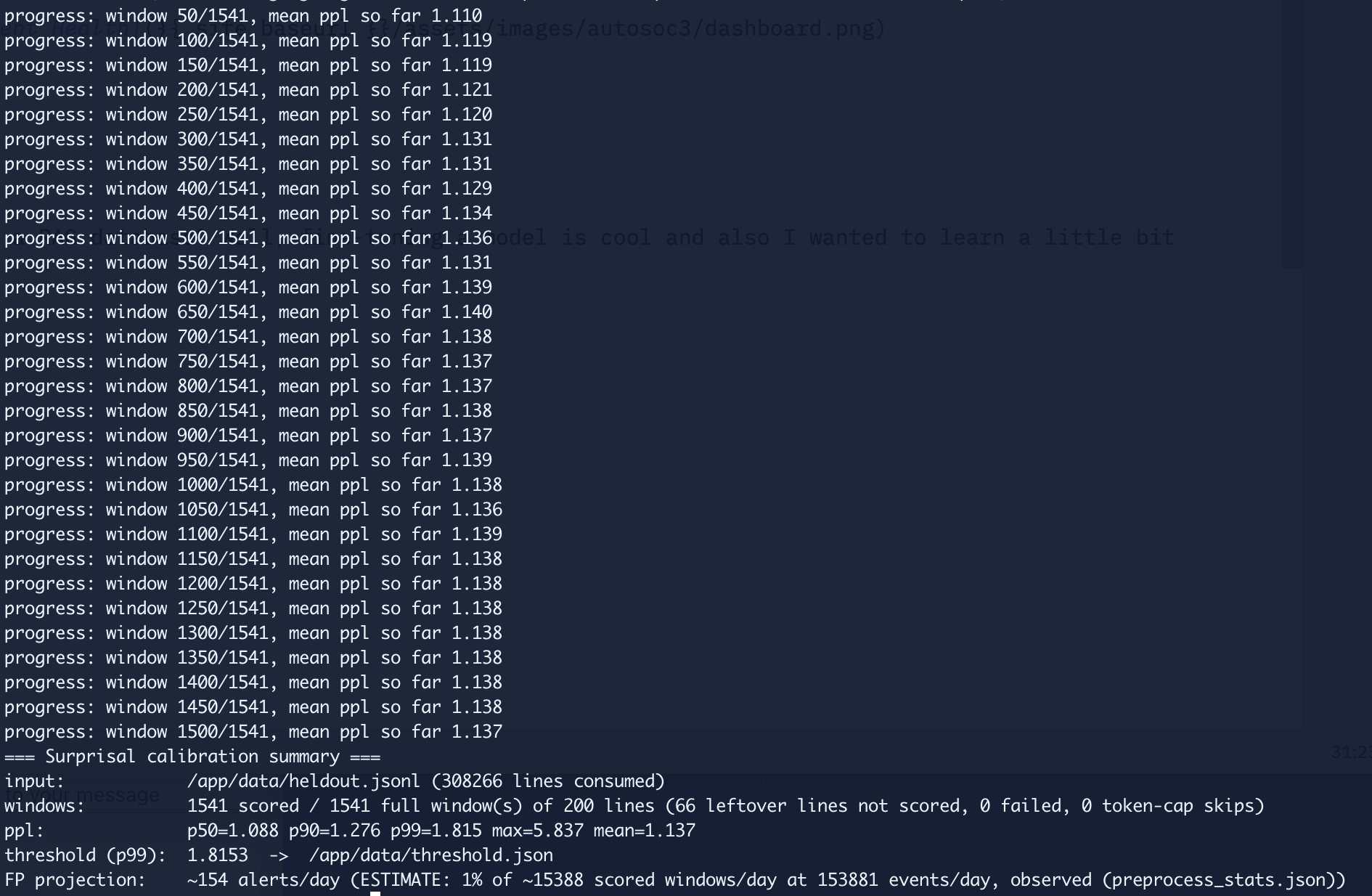
For testing and calibration purposes some of the original training data was held out to see how much FPs will be generated. After the quick 2-3 hour test the results were pretty doubtful, at least on a paper. FP projection was 154 alerts a day as shown on the picture below. Given that this is pretty small environment with not much data I wasn’t very hopeful.
How will this translate in real life though?
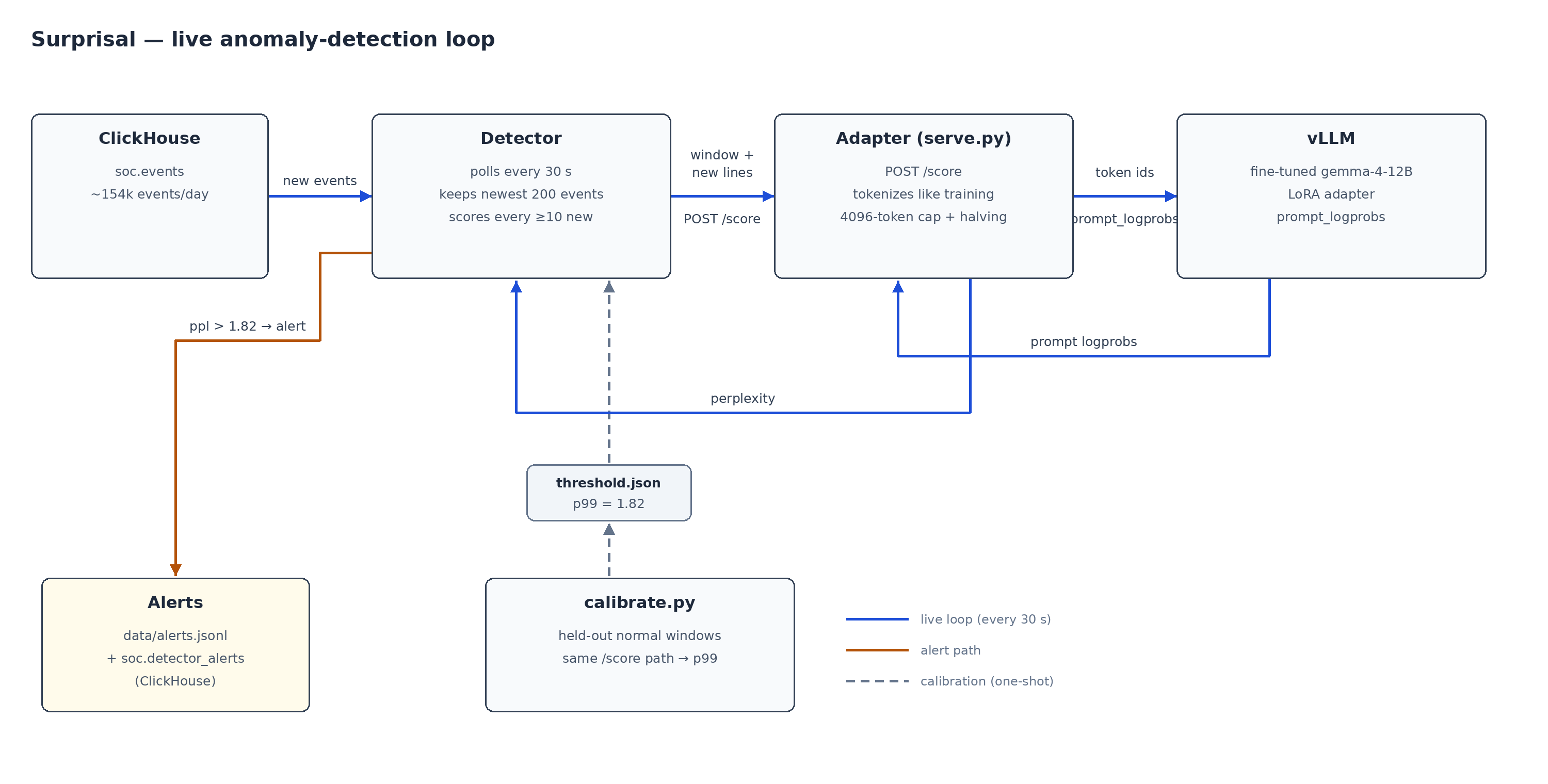
This was a test that needed three things to happen: pull new events from Clickhouse as they arrive, score them with the fine-tuned model, and alert when threshold is exceeded.
The detector itself is a boring little service which polls Clickhouse every 30 seconds, keeps a rolling window of the last 200 events. When at least 10 new events have piled up it asks the model one question: how surprised are you by these new lines, given everything before them? The answer is the perplexity over just the new lines. Event types the model has seen ten thousand times should score close to 1.0. Anomaly should score high.
A calibration script scores the previously mentioned held out normal windows through the exact same path the live detector uses and sets the threshold at p99, so roughly 1% of normal windows should trip it. The threshold is just a json file the detector re-reads every cycle. If any parameters is changed in the configuration the calibration needs to be run again.
“But it’s just a proxy to vLLM”?
Between the detector and vLLM sits a small adapter service which looks pretty pointless. It forwards one HTTP call, what’s the point? vLLM has no endpoint that answers “how surprising are these events”, it answers low-level questions like “what logprob did the model assign at position N of this prompt”. Somebody has to do the math.
Logprobs?
Logprobs are propabilities a model assigns to each output token. As we know, the GenAI models are just big fancy auto-complete machines so it basically is the likelyhood of what token will be the next one. For our context it means something like this: for the text … ps.exe -command the model might give 45% probability on the token -, 20% on $, 5% on Get, and share the remaining 30% across everything else it knows. The actual next token arrived which is in this example Get. The model had given it probability of 5% which translates to logprob of -3.0. So what does this mean?
- High probability: logprob is close to 0, meaning that it looks normal.
- Low probability: logprob is a large negative number, meaning that it looks abnormal.
The pipeline uses negative log-likelihood (NLL) meaning that a number closer to 0 would mean the model was sure of every token.
So the logprobs is the models way of answering the question if the data looked abnormal or not. It is given a perplexity score. Perplexity is just a confidence score turned upside down: divide 1 by how sure the model was, on average, about each next word. A model that is always right scores 1.0. A model flipping a coin scores 2.0. My normal lab traffic scores about 1.1. After the fine-tuning, the model is roughly nine times out of ten sure what the next word in a log line will be. The alert threshold sits at 1.82, which is confidence of about a coin flip (closer to 50%). In other words: the moment the model stops recognizing the data and has to start guessing, I get an alert. After learning exactly what “normal” looks like in my lab, having to guess is the anomaly.
The vLLM backend normally does not answer this question so we needed to have the adapter in middle. The adapter does three things. First, the perplexity calculation itself: locate the new lines inside the window, read the logprobs over that span, turn them into the score. Second, the tokenization guarantee: it tokenizes the window locally with the exact same settings the model was trained with and sends raw token ids to vLLM, to ensure the live scores are comparable with the calibration. Third, it is the translator to vLLM, during the experiment vLLM was updated which changed the request format used. The adapter errored out because of this which made it easy to notice that something changed in the backend. As you may see in the pipeline diagram, I called this experiment Surprisal.
Is it even working? My GPU says 0%
I was a little doubtful that it is working as I was monitoring the GPU usage and it stayed at 0%. The detector logs showed scores every 30 seconds, so something was clearly being done but the GPU utilization read a flat zero.
It was just my own lack of understanding how efficiently this works. It just barely uses the GPU. Each scoring call is prefill-only: the model generates nothing, we only read the logprobs of text that already exists. A fraction of a second of actual compute, every 30 seconds. Add prefix caching on top and the rolling window barely changes between calls, so most of even that fraction is cached. The way to actually see it live is the adapter logs: one completion call every 30 seconds, each answered well under a second.
Of course there were bugs
The first bug was a good old-fashioned infinite loop. Some background first: the model can only read so much text in one go, so the adapter refuses requests that are too long (the limit is 4096 tokens, because this is intended for continuous monitoring and needs to be efficient). The detector always remembers the last 200 events. When the adapter says a request is too long, the detector sends less: first the newest half of its memory, and if that is still too long, half again, until the request fits. That works fine when events trickle in at a normal pace.
Then the lab had a burst: more new events arrived at once than the full background could hold. The events the detector asks the model to grade must be inside the text it sends. So every retry went like this: “here’s half the background” -> “the events you want graded are not in here” -> “okay, trying again.” The logs looked busy, everything looked alive, and in reality not a single event was being graded while the backlog kept growing as it was looping. The simple fix: when you cut the background, cut the new events too. Grade the newest ones that fit.
So what does the fix mean in practice? For example 600 events arrive in one burst. The detector’s memory only holds the newest 200 events, so the oldest 400 fall out of memory right away. It then tries to grade the newest 200, but that is too much text for the model’s reading budget, so the request gets halved until it fits and the grading list gets cut to match, always keeping the newest events. In the end the model reads the newest 50 events and grades them. The trade-off: during a huge burst, most of the burst is never individually scrutinized. But an attack is never one event, whatever is still anomalous keeps producing new events, and the next batch 30 seconds later gets graded normally. In reality the current window might be too small and needs to be increased in the future.
The second bug was a misconfigured environment variable which made every scoring request go to the base model instead of the fine-tuned one. Everything green in the logs, plausible perplexities, alerts pipeline working and the entire experiment would have silently been measuring the wrong model.
So, the profit(?) verdict
The serving cost is effectively zero: one tiny prefill call every 30 seconds on hardware that was already powered on. The maintenance so far has been a couple of environment variables and one vLLM version pin.
Was the fine-tuning worth it in the end?
I tested this with multiple methods. First, I just let it run against the data flowing in the lab. There was no anomalies being generated just the normal data flowing in. I let it run against this normal data for around 12 hours and it generated 0 alerts which was a little surprising to me as I was expecting FPs based on the FP projection.
I was pretty sure that it’s not working at all so I flipped the vLLM backend from the fine-tuned model to vanilla Gemma 4 12b. Results shown on the picture below (ignore the errors, it just was not able to push the alerts to ClickHouse which doesn’t really matter), it was generating lots of FPs immediately. So clearly the fine-tuned model had learned what normal looks like in the environment.
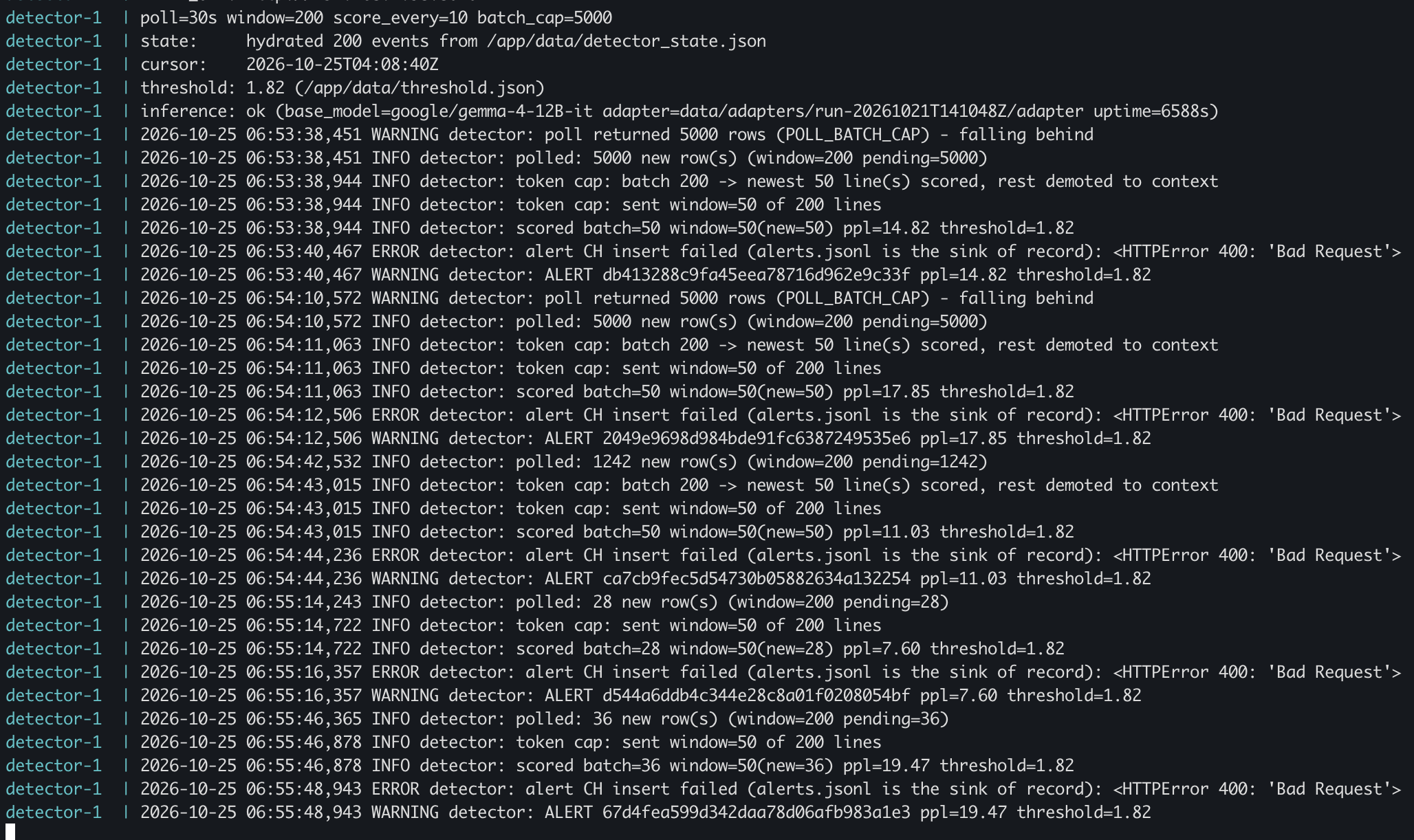
..or had it? I did not reran calibration before testing vanilla.. So for complete research I reran the calibration with the vanilla model to see if it changes the outcome. Well it increased the threshold from 1.82 to 213.65. This means that the alerting threshold for the detector had to be moved from 1.83 to 213.65 to stop the constant FPs, which translates to 55% confidence against ~0.5% confidence. The fine-tuned model knows much better what normal looks like but both will still flag top 1%. This indicates that fine-tuning may be worth it but does not prove it yet. For that purpose a clear attack simulation is needed.
The attack simulation
The simulation is pretty simple 9 step “attack” against the target environment. Nothing fancy, pretty basic but it should cause noise which should be picked up by the models if they work well. It starst with password spray attempt and ends with bogus persistence creation. While the test is standardized its driven by LLM (yes, I am lazy) so there can be some little deviations between of the runs. However, it should log everything down with times to compare against the alerts.
The first run was executed against the vanilla Gemma 12B model as I had that configured at the time. It generated 0 alerts of the attack test which was a little worrying. I ran it again against the fine-tuned model and the same thing happened, no alerts raised. It seems that it is not able to pinpoint anomalies at least if they are not super clear. After investigating, it seems that it should pick it up with a higher perplexity score, the average is around 1.15 and the anomaly was approximately 1.63. So, I lowered the threshold to 1.50 and also increased the max token window so it can read more lines at once.
This did not change anything in the real test. And the reason for that was that it did not hit “the same lines” within the live as with my replayed attack. So it is pure luck if it would hit or not. Because of how the grading worked, some of the malicious entries were out of the window, moved to the background and thus it was not performing as expected. The fix was to include the previous request partly in the new request and trust the caching feature of vLLM, not affecting the performance too much. In other words, it did not grade all the lines previously as some of the older ones were pushed to background, which meant that the scoring did not see all the malicious activity.
After these changes, the detection worked. It did alert of the malicious activity, however at the same time there was powershell burst activity ongoing on different hosts which also raised alerts. This was a little confusing given that it happened at exactly the same time; there are no false positives being raised most of the time that the detector is running. I decided to run the attack simulation once more. This time, 2 alerts were generated, one from the actual anomaly and the second one from powershell activity on other devices, weirdly. Looking at it for longer periods of time there are false positives being raised at an alarming rate often scoring higher perplexity scores than the actual malicious activity.
Does this answer whether fine-tuning was worth it? No, it does not. However, if we would run the same perplexity threshold against the vanilla model it would be filled with CONSTANT false positives which kind of proves the point that fine-tuning can make it more efficient. Further tuning of the pipeline would be needed even on lab environment as it raises bit too many false positives (approx 5 an hour) or maybe adding AI analysis to go through the alert before raising it to a human. Maybe the same fine-tuned model would do well in analysis?
I could continue from this topic but wanted to stop here. Maybe I will do a part 2 sometime!
Final Thoughts
Isn’t this a use case for machine learning on generative AI? Well.. Maybe. I investigated the machine learning approach in my thesis and while many of the use cases proved to be very useful at least in lab environment the one model which was really struggling was the generic anomaly detector. This is kind of trying to achieve the same thing but with a generative AI. The results are in my opinion somewhat promising but it is way different to do this on lab instead of a real environment. I suspect, this would not work at all with this scope in real life, however, with more limited scope maybe it would.
This has been very interesting to me personally and I have learned a lot from fine-tuning a model to creating an anomaly detector using GenAI instead of ML. Pretty cool for a data nerd like me!
 Autonomous SOC, part 3, GUI and further agents